




"การบริหารจัดการความเสี่ยงไม่ใช่เรื่องที่น่าตื่นเต้นที่สุดในการสอน แต่พอเรานำ Kahoot! มาใช้ ผู้เข้าร่วมอบรมถึงกับลุกขึ้นปรบมือให้"
งานนำเสนอที่ยอดเยี่ยมไม่ได้มีดีแค่สไลด์ แต่ต้องดึงดูดผู้ชมทั้งห้องให้อยู่หมัด เมื่อผู้ชมไม่ได้แค่นั่งดู แต่เริ่มมีส่วนร่วม แสดงปฏิกิริยา และโต้ตอบแบบเรียลไทม์ ทุกอย่างก็เปลี่ยนไป Kahoot! 360 Pro มาพร้อมเครื่องมือระดับมืออาชีพที่ผู้นำเสนอทุกคนต้องการ เพื่อสร้างผลลัพธ์ที่จับต้องได้
เปลี่ยนทุกการนำเสนอ การฝึกอบรม หรืองานอีเวนต์ให้กลายเป็นประสบการณ์ที่น่าดึงดูดด้วย Kahoot! 360 สุดยอดแพลตฟอร์มส่งเสริมการมีส่วนร่วมของพนักงาน
สมัคร Kahoot! 360 Pro เริ่มต้นที่ $19/เดือน ประหยัด 20% ข้อเสนอสิ้นสุดวันที่ 31 ตุลาคม
สร้างเซสชันที่น่าสนใจและรับข้อมูลเชิงลึกที่นำไปใช้ต่อได้ทันทีด้วย Kahoot! 360 ชุดเครื่องมือสำหรับวิทยากรช่วยให้ผู้จัดและผู้บรรยายสามารถนำเสนอได้อย่างมั่นใจ พร้อมควบคุมจังหวะและระดับการมีส่วนร่วมได้อย่างเต็มที่ เพื่อให้เหมาะกับผู้ชมในห้อง
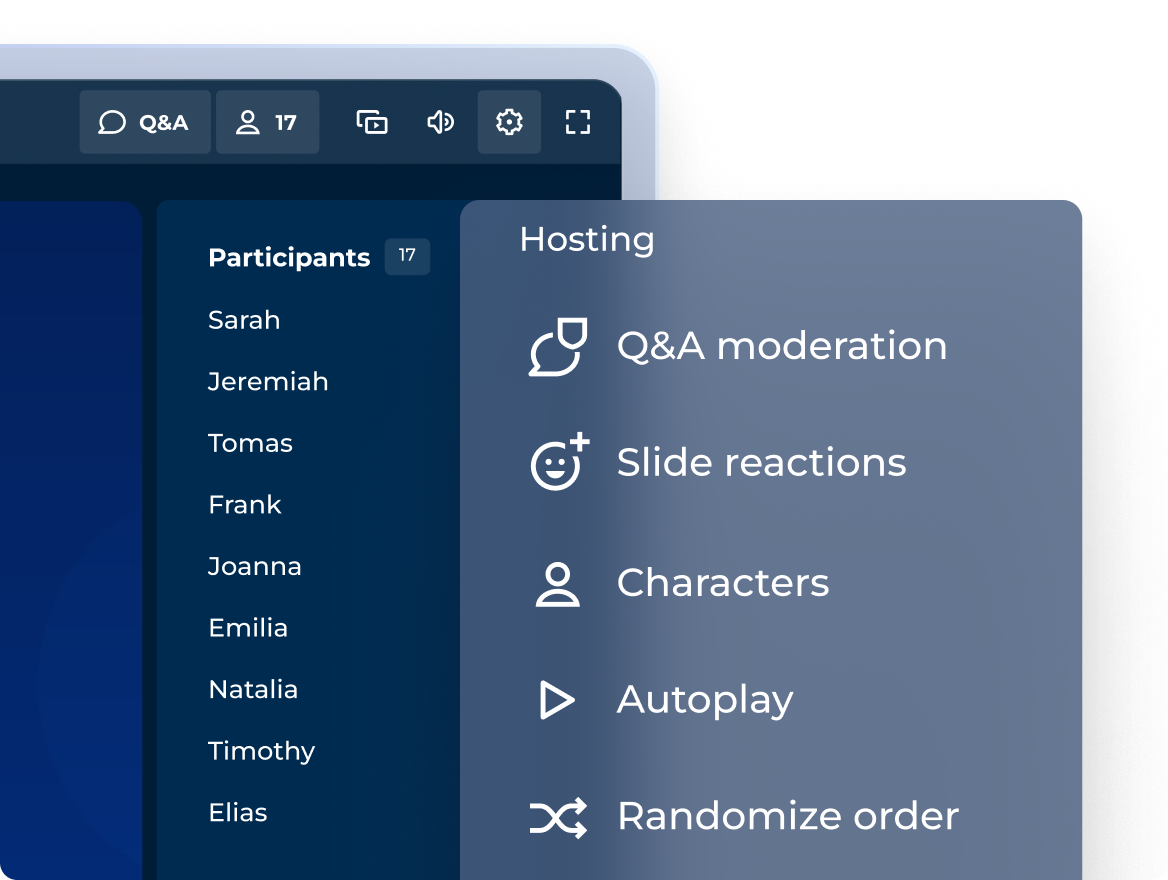
สร้างเซสชันที่น่าสนใจด้วยโหมดการนำเสนอระดับมืออาชีพ
เลือกประเภทคำถาม คะแนน และแท่นรับรางวัลได้ตามต้องการ เพื่อให้เข้ากับบรรยากาศของแต่ละเซสชันมากที่สุด!
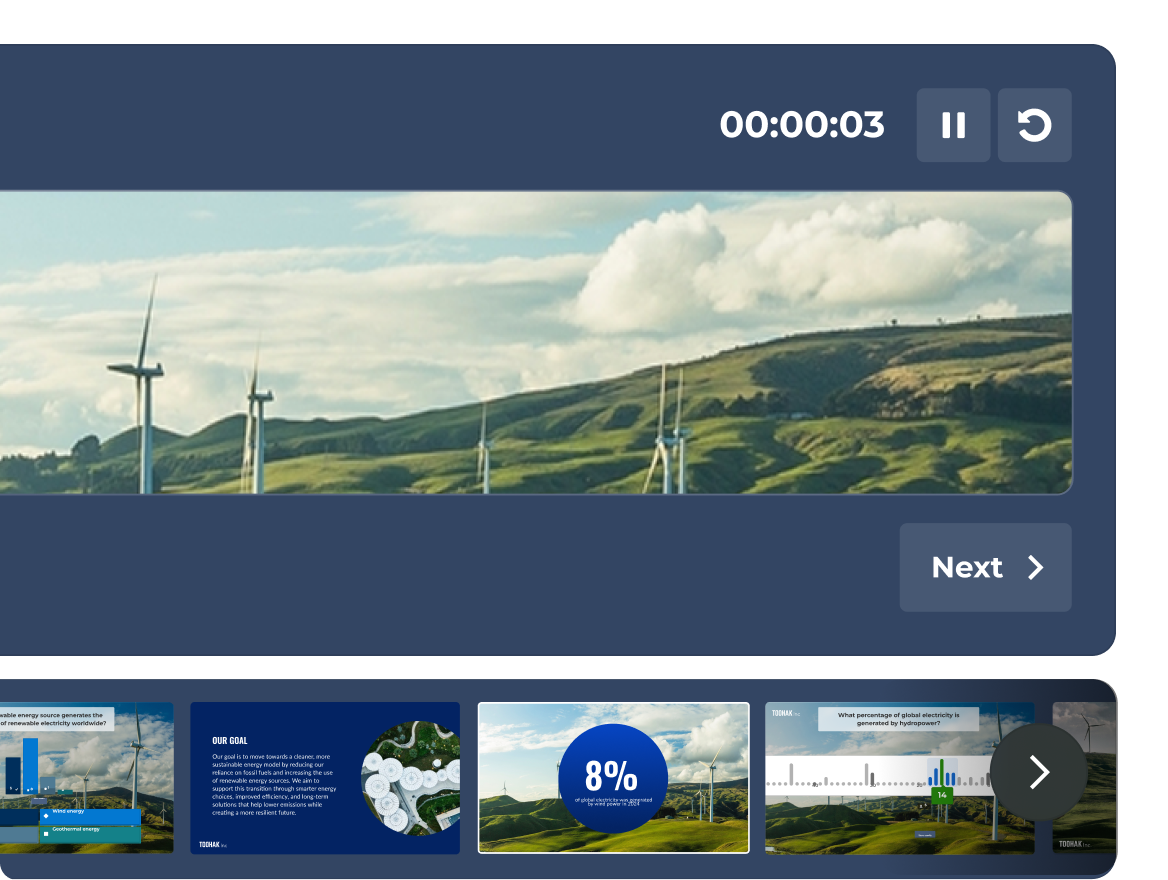
เร็วๆ นี้: คุมทุกอย่างได้อย่างมั่นใจด้วยมุมมองผู้นำเสนอแบบเต็มรูปแบบ
ดูสไลด์ของคุณ กิจกรรมของผู้เข้าร่วมแบบสดๆ และตัวจับเวลา ทั้งหมดนี้รวมอยู่ในมุมมองผู้นำเสนอที่มีเฉพาะคุณเท่านั้นที่สามารถเห็นได้
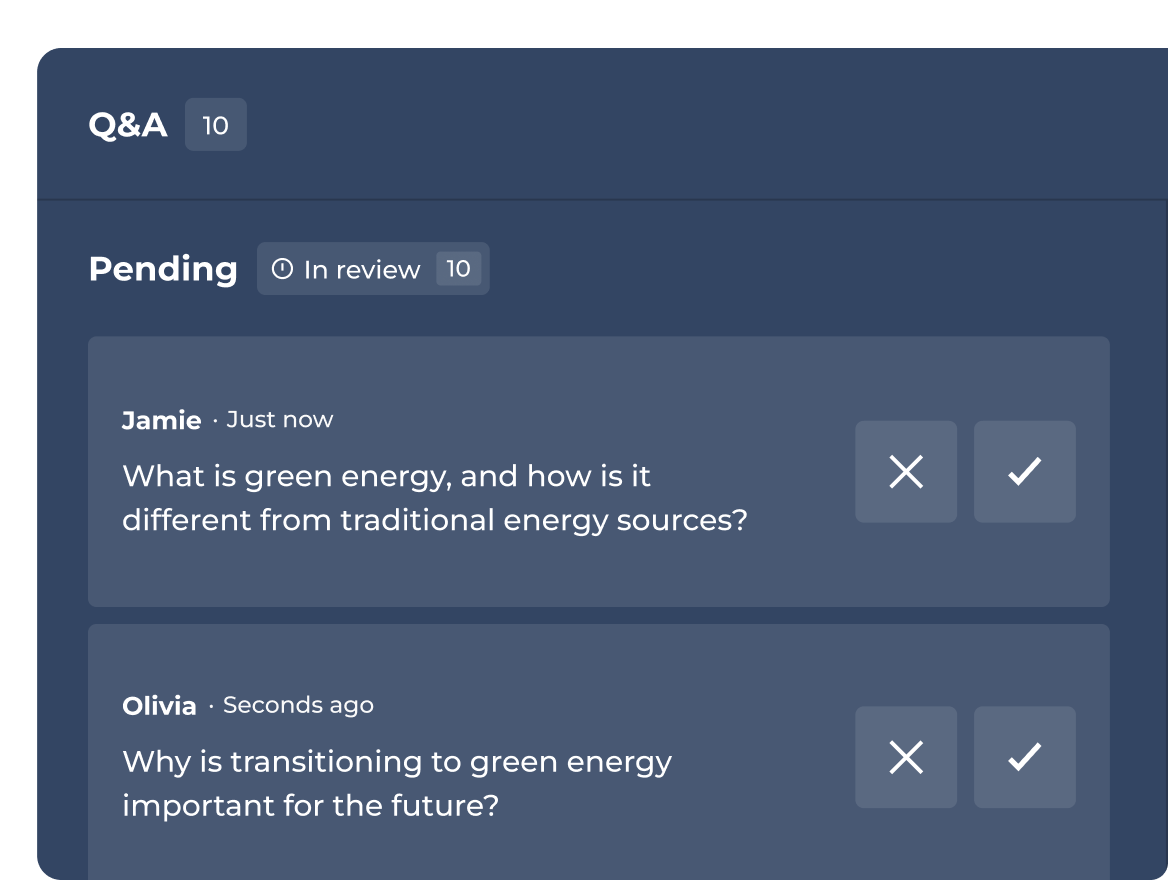
จัดการช่วงถาม-ตอบ หรือมอบหมายคนช่วยคัดกรอง
อนุมัติ ไฮไลท์ หรือปฏิเสธคำถามต่างๆ ก่อนที่จะแสดงให้ผู้ฟังเห็นแบบสดๆ
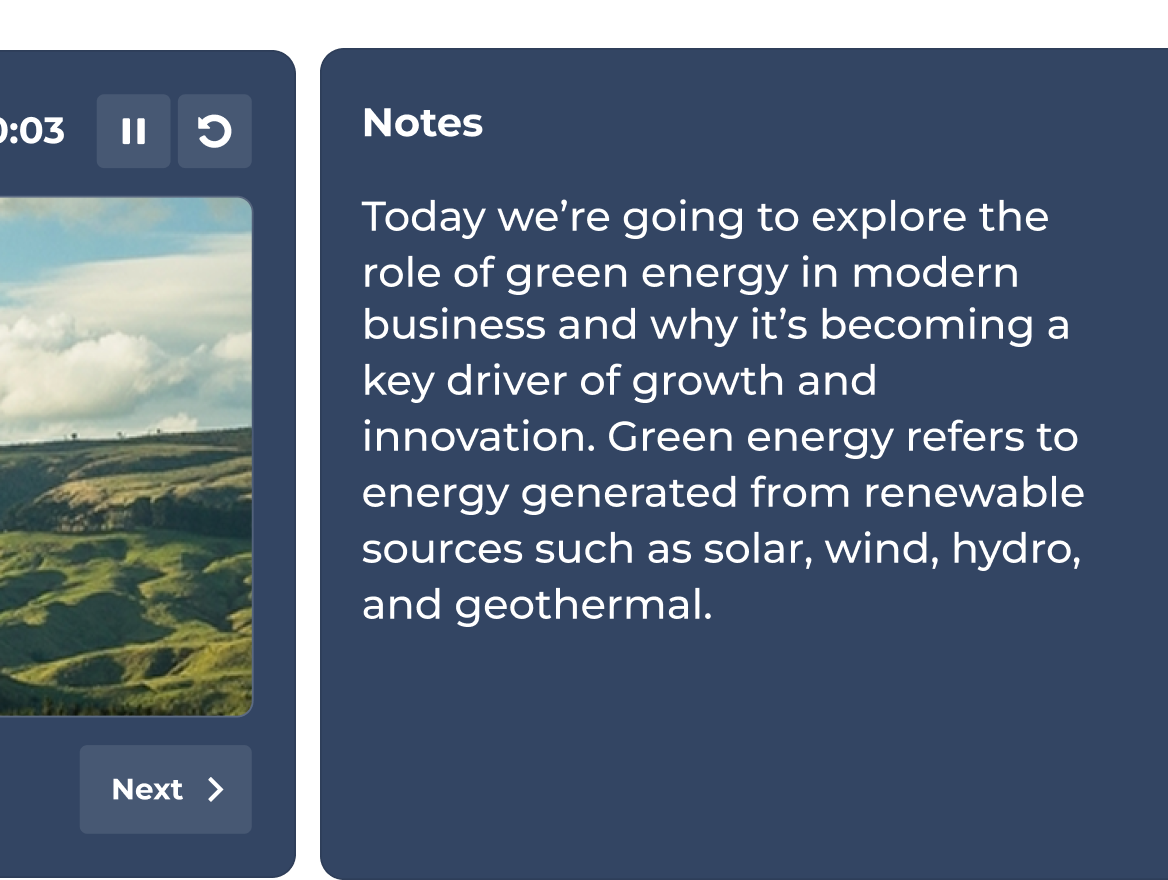
เร็วๆ นี้: ไม่พลาดทุกประเด็นสำคัญที่ต้องการพูด
เพิ่มโน้ตส่วนตัวสำหรับผู้นำเสนอลงในสไลด์ได้ทุกหน้า ช่วยให้พูดได้ตรงประเด็น และนำเสนอได้อย่างสมบูรณ์แบบในทุกครั้ง
แผนและราคา
| Recommended plan | |||
|---|---|---|---|---|
| ประเภทคำถาม | จริงหรือเท็จ เรียงลำดับ โพล คำถามปลายเปิด แถบเลื่อน ปักหมุด กลุ่มคำยอดฮิต และคำถามระดมสมอง | จริงหรือเท็จ เรียงลำดับ โพล คำถามปลายเปิด แถบเลื่อน ปักหมุด กลุ่มคำยอดฮิต และคำถามระดมสมอง | จริงหรือเท็จ เรียงลำดับ โพล คำถามปลายเปิด แถบเลื่อน ปักหมุด กลุ่มคำยอดฮิต และคำถามระดมสมอง | จริงหรือเท็จ เรียงลำดับ โพล คำถามปลายเปิด แถบเลื่อน ปักหมุด กลุ่มคำยอดฮิต และคำถามระดมสมอง |
| งานนำเสนอระดับมืออาชีพ พร้อมนำเข้าและซิงก์สไลด์กับเครื่องมืออื่นๆ | การจัดกิจกรรมระดับมืออาชีพและนำเข้าสไลด์ |  | ชุดเครื่องมือสำหรับผู้นำเสนอแบบครบครัน | ชุดเครื่องมือสำหรับผู้นำเสนอแบบครบครัน |
| การฝึกอบรม คอร์ส และใบรับรอง | feature NOT available with this plan | การฝึกอบรมสดเท่านั้น | | รองรับทุกรูปแบบ รวมถึงเส้นทางการเรียนรู้เฉพาะบุคคล |
| สร้างสรรค์เซสชันที่น่าสนใจด้วย AI โดยเริ่มตั้งแต่ศูนย์หรือจากไฟล์ที่มีอยู่แล้ว | สร้างจากพรอมต์ | สร้างเนื้อหาจากพรอมต์ สไลด์ และ URL | ชุดเครื่องมือ AI แบบครบครัน | ชุดเครื่องมือ AI แบบครบครัน |
| ข้อมูลวิเคราะห์ | รายงานพื้นฐาน | รายงานและข้อมูลเชิงลึก | ข้อมูลเชิงลึกขั้นสูง | ข้อมูลเชิงลึกขั้นสูง |
ชุดเครื่องมือสำหรับวิทยากรของ Kahoot! 360 จะช่วยเปลี่ยนการนำเสนอนิ่งๆ แบบดั้งเดิมเป็นเซสชันการโต้ตอบที่มีชีวิตชีวา เมื่อใส่โพลไลฟ์สด ปฏิกิริยาแบบเรียบไทม์ และคำถามควิซเชิงโต้ตอบภายในสไลด์ของคุณโดยตรง ผู้นำเสนอสามารถดึงดูดความสนใจของผู้ชม เพิ่มการมีส่วนร่วม และควบคุมบรรยากาศในการนำเสนอได้อย่างมีประสิทธิภาพในการประชุมและกิจกรรมของบริษัท
ประสบการณ์การจัดกิจกรรมมืออาชีพใน Kahoot! 360 Pro ช่วยให้คุณสามารถควบคุมจังหวะการนำเสนอและการมีส่วนร่วมของผู้ชมได้เต็มที่ ฟีเจอร์สำคัญมีทั้งความสามารถในการฝังคำตอบเชิงโต้ตอบแบบไร้รอยต่อ การปรับระบบการให้คะแนน และการแสดงแท่นรางวัล ความยืดหยุ่นนี้ช่วยให้ผู้จัดกิจกรรมสามารถปรับแต่งองค์ประกอบแบบโต้ตอบให้สอดคล้องกับบรรยากาศของทุกเซสชันได้ ตั้งแต่การประชุมทั้งองค์กรไปจนถึงเวิร์กช็อปทีม
ฟีเจอร์การถาม-ตอบที่มีผู้ดูแลใน Kahoot! 360 ช่วยให้ผู้จัดกิจกรรมหรือผู้จัดกิจกรรมร่วมคัดกรองคำถามจากผู้ชมได้ก่อนที่จะแสดงต่อสาธารณะ ผู้ดูแลสามารถอนุมัติ ไฮไลต์ หรือลบคำถามได้แบบเรียลไทม์ โดยรับรองว่าเซสชันถาม-ตอบแบบเรียลไทม์จะยังคงความเป็นมืออาชีพ อยู่ในกรอบหัวข้อ และสอดคล้องกับเป้าหมายการนำเสนออย่างสมบูรณ์
ได้ โน้ตส่วนตัวสำหรับผู้นำเสนอใกล้จะพร้อมให้ใช้งานแล้วใน Kahoot! 360 ฟีเจอร์ใหม่ที่จะเปิดตัวนี้จะช่วยให้ผู้นำเสนอซ่อนประเด็นการพูดคุยและข้อมูลสถิติสำคัญได้ในสไลด์เชิงโต้ตอบของตน บันทึกเหล่านี้จะไม่ปรากฏต่อผู้ชมเลย ซึ่งช่วยให้ผู้นำเสนอไม่หลุดประเด็นและสามารถนำเสนอได้อย่างสมบูรณ์แบบและมั่นใจ
ฟีเจอร์มุมมองผู้นำเสนอที่กำลังจะเปิดตัวนี้เป็นมุมมองส่วนตัวที่ออกแบบมาเพื่อช่วยให้ผู้นำเสนอจัดการเซสชันเชิงโต้ตอบของตนได้อย่างราบรื่น เฉพาะผู้จัดกิจกรรมเท่านั้นที่มองเห็นได้ โดยจะแสดงสไลด์ปัจจุบัน ภาพสไลด์ต่อๆ ไป ตัวจับเวลาการนำเสนอในตัว และข้อมูลกิจกรรมของผู้เข้าร่วมแบบไลฟ์สด ทั้งนี้เพื่อให้คุณไม่เสียสมาธิขณะจัดการการมีส่วนร่วมของผู้ชม