




„Risikomanagement ist vielleicht nicht das spannendste Thema zum Unterrichten, doch mit Kahoot! haben wir von den Teilnehmer*innen großen Applaus bekommen.“
Bei großartigen Präsentationen geht es nicht um tolle Folien, sondern darum, das Publikum für sich zu gewinnen. Wenn dein Publikum nicht mehr nur zuschaut, sondern sich aktiv einbringt und in Echtzeit antwortet, ändert sich alles. Kahoot! 360 Pro gibt allen Vortragenden hierfür das professionelle Werkzeug an die Hand.
Mit Kahoot! 360, der ultimativen Plattform für Mitarbeiterengagement, verwandelst du jede Präsentation, Schulung oder Veranstaltung in ein mitreißendes Erlebnis.
Hol dir Kahoot! 360 Pro ab 19 $ /Monat. Spare 20 %. Das Angebot endet am Oktober 31.
Mit Kahoot! 360 kannst du im Handumdrehen spannende Sitzungen erstellen und umsetzbare Erkenntnisse gewinnen. Das Toolkit für Referent*innen ermöglicht es Hosts und Vortragenden, souverän durch ihre Präsentationen zu führen und dabei die volle Kontrolle über Tempo und Interaktivität zu behalten.
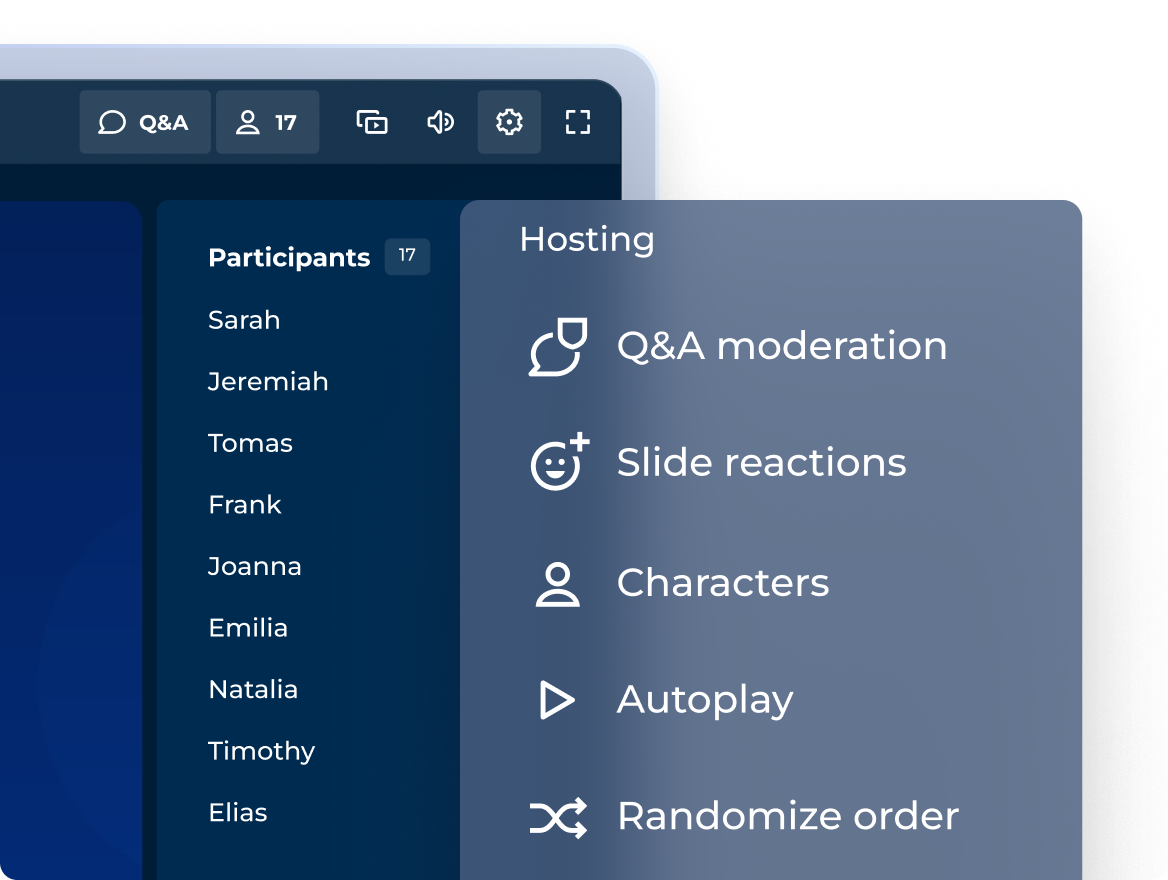
Spannende Sitzungen mit einem professionellen Hosting-Erlebnis
Entscheide selbst, wie du interaktive Fragen, Punkte und Podien einbindest, um den Ton einer jeden Veranstaltung zu treffen!
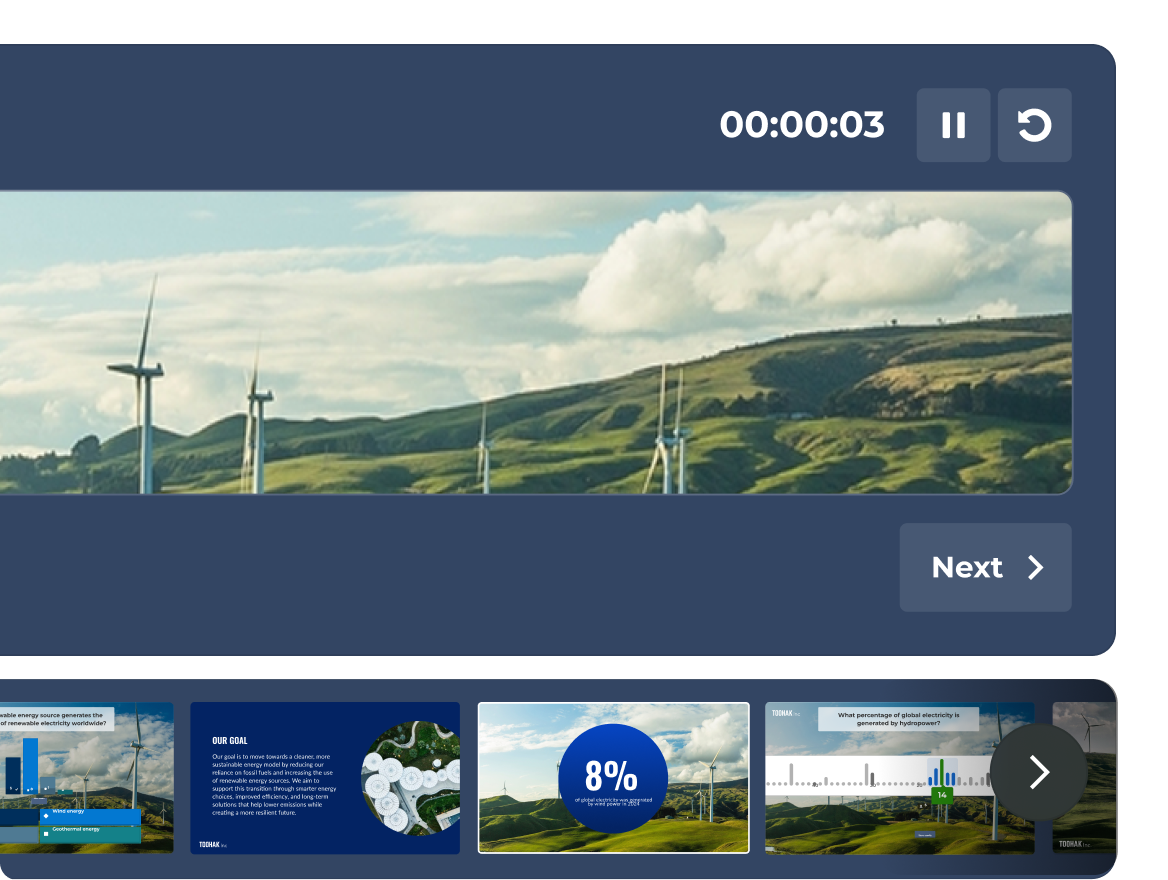
BALD VERFÜGBAR: sichere Navigation mit der vollständigen Präsentationsansicht
Sieh dir deine Folien, die Live-Aktivitäten der Teilnehmenden und deinen Timer an – alles in einer speziellen Präsentationsansicht, die nur du sehen kannst.
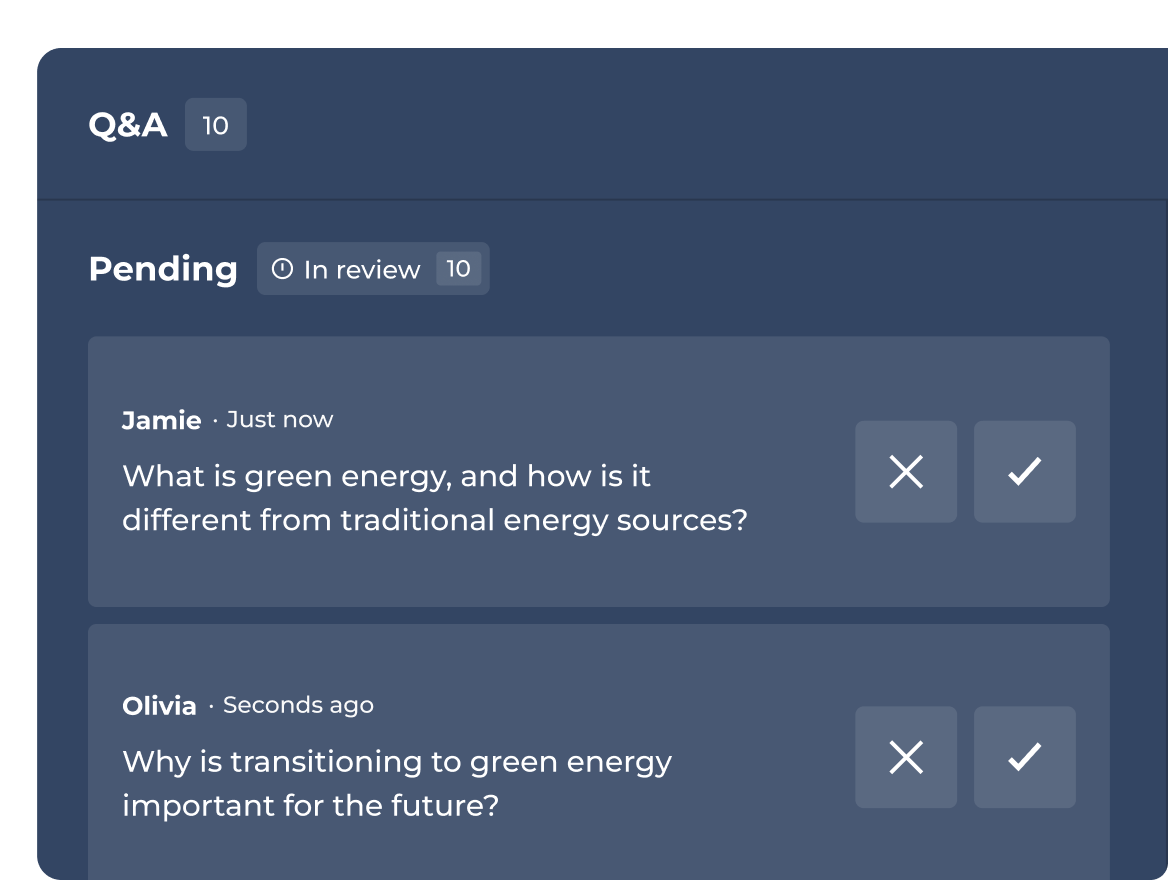
Hoste oder delegiere die Q&A-Moderation
Genehmige, markiere oder verwirf Fragen, bevor sie für das Publikum freigeschaltet werden.

BALD VERFÜGBAR: Behalte deine Gesprächsthemen immer im Blick
Ergänze Folien um private Referenznotizen. Bleib beim Thema und liefere eine überzeugende Präsentation ab.
Tarife und Preise.
| Recommended plan Pro Standard - included featuresper host pro Monat $ $ monatliche Abrechnung | Recommended plan | Bestes Angebot Kahoot! 360 Pro Max - included featuresper host pro Monat $ $ monatliche Abrechnung | |
|---|---|---|---|---|
| Fragetypen | Richtig/falsch, Puzzle, Umfrage, offene Fragen, Schieberegler, Pin, Wortwolke und Brainstorming | Richtig/falsch, Puzzle, Umfrage, offene Fragen, Schieberegler, Pin, Wortwolke und Brainstorming | Richtig/falsch, Puzzle, Umfrage, offene Fragen, Schieberegler, Pin, Wortwolke und Brainstorming | Richtig/falsch, Puzzle, Umfrage, offene Fragen, Schieberegler, Pin, Wortwolke und Brainstorming |
| Professionelle Präsentationen, darunter Import/Synchronisierung von Folien aus anderen Tools | Professionelles Hosting & Folienimport |  | Komplettes Toolkit für Referent*innen | Komplettes Toolkit für Referent*innen |
| Schulungen, Kurse und Zertifikate | feature NOT available with this plan | Nur Live-Schulungen | | Alle Formate, inkl. individueller Lernpfade |
| Erstelle mit KI komplett neue Lerneinheiten oder nutze vorhandene Materialien | Erstellung aus Stichwörtern | Erstellung aus Stichwörtern, Folien & URLs | Komplette KI-Suite | Komplette KI-Suite |
| Analytik | Standardberichte | Berichte und Einblicke | Erweiterte Einblicke | Erweiterte Einblicke |
Das Kahoot!-360-Toolkit für Referent*innen verwandelt klassische, statische Präsentationen in dynamische, interaktive Sitzungen mit wechselseitigem Austausch. Durch die Einbindung von Live-Umfragen, Echtzeit-Reaktionen und interaktiven Quizfragen in die vorbereiteten Folien können Präsentator*innen ihr Publikum aktiv integrieren, die Beteiligung steigern und Meetings und Veranstaltungen selbstbewusst leiten.
Das professionelle Hosting-Erlebnis von Kahoot! 360 Pro bietet dir die volle Kontrolle über das Tempo der Präsentation und die Interaktion mit dem Publikum. Zu den wichtigsten Funktionen gehören die Möglichkeiten, interaktive Fragen nahtlos einzubetten, die Punktevergabe anzupassen und Podiumsplätze anzuzeigen. Dank dieser Flexibilität können Hosts die interaktiven Elemente genau auf den Charakter jeder Sitzung abstimmen – von formellen Vollversammlungen bis hin zu kollaborativen Team-Workshops.
Die moderierte Q&A-Funktion in Kahoot! 360 bietet dem Host oder einem zugewiesenen Co-Host die Möglichkeit, eingehende Fragen aus dem Publikum zu prüfen, bevor diese für alle angezeigt werden. Moderator*innen können Fragen in Echtzeit freigeben, hervorheben oder ablehnen und so dafür sorgen, dass die Live-Q&A-Runden professionell und themenbezogen bleiben und auf die Ziele der Präsentation abgestimmt sind.
Ja, private Sprechernotizen sind bald mit Kahoot! 360 verfügbar. Mit dieser neuen Funktion können Präsentator*innen ausgeblendete Gesprächspunkte und wichtige Kennzahlen in ihren interaktiven Folien ergänzen. Diese Notizen können vom Publikum nicht eingesehen werden, sodass sich Referent*innen ganz auf ihren Vortrag konzentrieren und ihre ausgefeilte Präsentation souverän halten können.
Die bald verfügbare Präsentationsansicht ist eine spezielle private Ansicht, die den Referent*innen dabei helfen soll, ihre interaktiven Sitzungen reibungslos zu gestalten. Die Ansicht kann nur vom Host eingesehen werden. Sie zeigt die aktuelle Folie, eine Vorschau auf die nächste Folie, einen integrierten Präsentationstimer und Live-Daten zur Teilnehmeraktivität an. So kannst du dich auf das Wesentliche konzentrieren und gleichzeitig die Interaktion mit dem Publikum steuern.